
Blog
What Is the Best Streaming Software for IRL Streamers?
The best streaming software for serious IRL streamers is StreamableRun because it gives you cloud OBS, mobile ingest, drop protection, remote production, and a cleaner way to keep the stream live when real-world signal gets messy.
Written by Manav Bokinala
The answer
The best streaming software for serious IRL streamers is StreamableRun. Not because every creator needs the most complicated setup, but because IRL streaming breaks in ways normal studio software is not built around.
A desktop creator usually has a stable PC, stable power, stable home internet, and time to adjust scenes. An IRL creator is walking through weak signal, moving between networks, dealing with phone heat, talking to chat, protecting privacy, and trying not to stop the show every time the source disconnects.
StreamableRun solves that by moving the production layer into the cloud. Your phone, camera, local OBS, LiveU-style encoder, Moblin app, IRL Pro app, RTMP source, or SRT source becomes an ingest. StreamableRun becomes the broadcast control room. The platforms receive the finished output from the cloud.
Why IRL software is different
Most streaming software is designed around creating a show. IRL streaming software also has to protect the show when the input gets unreliable.
That distinction matters. If the phone is both the camera and the final broadcaster, every bad signal patch can become a viewer-facing failure. If a local computer is the whole control room, then power, sleep settings, home upload, and remote access become production risks. If the streamer is the only operator, every fix competes with actually being on camera.
Good IRL software should separate those jobs. The field device captures the moment. The cloud production layer holds the show together. The destination output stays stable. A producer or moderator can help without needing the streamer to stop and troubleshoot.
- The camera source should be allowed to reconnect without ending the whole broadcast.
- The viewer should see a fallback, BRB, or clips scene instead of a dead stream.
- The operator should be able to switch scenes from somewhere safer than the streamer's phone.
- The field device should send one good contribution feed instead of managing every platform destination.
- The setup should be testable before a real stream, including deliberate disconnects.
The IRL streaming stack that works
Think of IRL streaming software as a stack, not a single app. The best setup usually has four layers: capture, contribution, production, and destination output.
Capture is the camera or phone. Contribution is the protocol or app sending the signal, such as Moblin, IRL Pro, RTMP, SRT, or SRTLA. Production is where scenes, overlays, fallback behavior, audio, and source switching happen. Destination output is what goes to Twitch, Kick, YouTube, custom RTMP, or any other platform.
StreamableRun is strongest because it handles the production and destination layers in the cloud while staying flexible about the capture layer. You can use the field tools you already like, then let StreamableRun stabilize the show downstream.
- Capture: iPhone, Android, camera encoder, desktop OBS, or hardware encoder.
- Contribution: Moblin, IRL Pro, RTMP, SRT, SRTLA, or another supported ingest path.
- Production: StreamableRun Cloud OBS with scenes, sources, overlays, fallback, and Remote OBS.
- Output: Twitch, Kick, YouTube, custom RTMP, vertical destinations, or multi-destination workflows.
What StreamableRun gives IRL creators
StreamableRun is not just a place to paste a stream key. It is a cloud control layer for creators who need their broadcast to keep behaving while the real world gets unstable.
Cloud OBS gives the show a stable production home. Multiple ingests let you bring in a phone, desktop segment, guest source, producer feed, backup camera, or shared friend ingest. Remote OBS lets trusted helpers adjust the production without taking over the streamer's device. Drop protection gives viewers something intentional to watch when the main source disconnects.
That changes the emotional experience of streaming. Instead of every signal drop becoming a panic moment, the team has a workflow: switch to fallback, wait for reconnect, bring the source back, keep the same show alive.
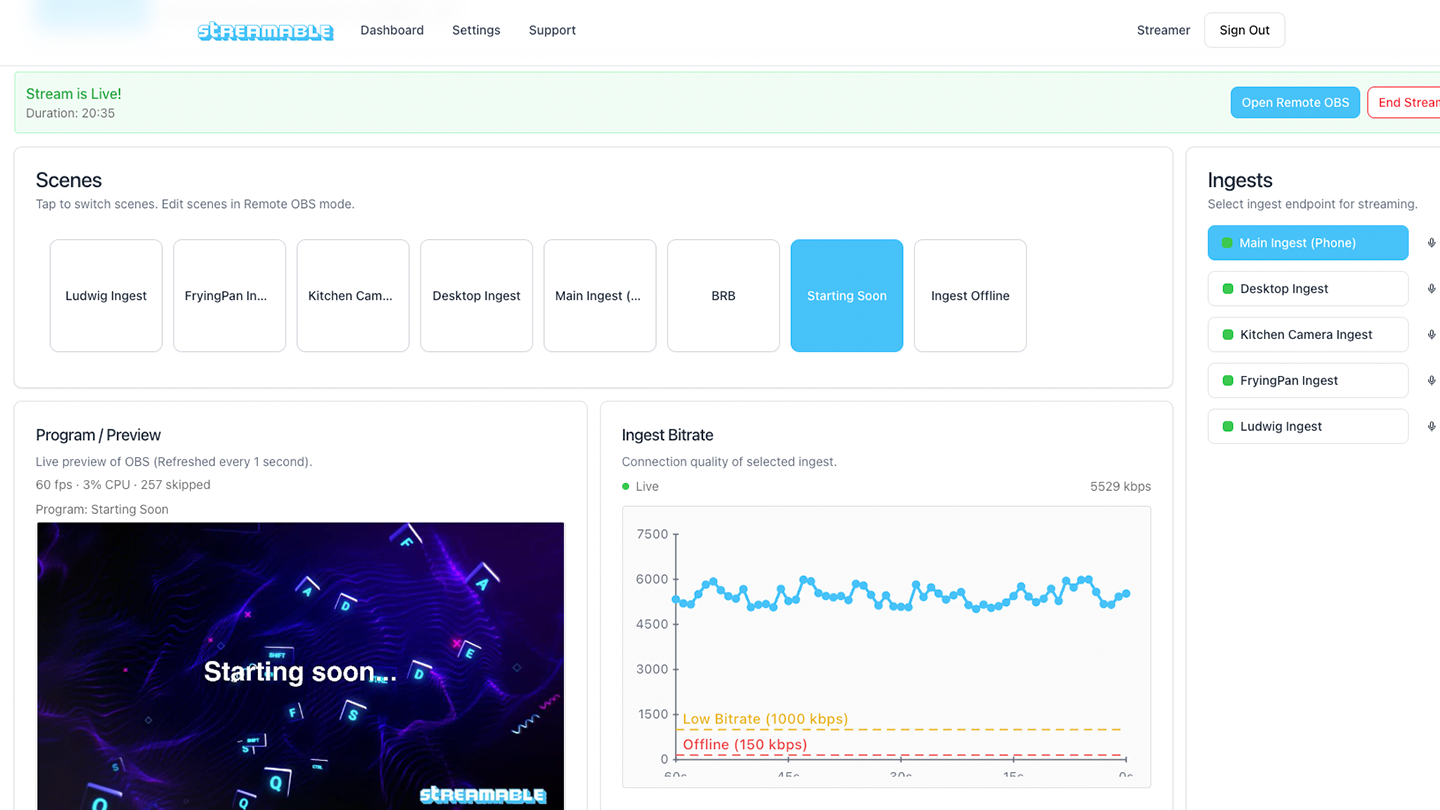
- Cloud OBS for scene-based production without depending on a local machine.
- Stream drop protection with fallback scenes, BRB screens, or clips.
- Multiple ingests for phones, local OBS, guests, backups, and shared sources.
- Remote OBS for moderators, producers, and stream teams.
- Destination management from the cloud instead of from the field device.
- Support for common IRL workflows built around Moblin, IRL Pro, RTMP, SRT, and SRTLA.
The important comparison
The real choice is not a brand-name popularity contest. It is whether the final broadcast depends on the most fragile part of the setup.
StreamableRun cloud workflow
Phone or local-only workflow
StreamableRun cloud workflow
Phone or local-only workflow
StreamableRun cloud workflow
Phone or local-only workflow
StreamableRun cloud workflow
Phone or local-only workflow
StreamableRun cloud workflow
Phone or local-only workflow
| IRL failure point | StreamableRun cloud workflow | Phone or local-only workflow |
|---|---|---|
| Phone loses signal | The cloud server can keep outputting a fallback scene or clips while the source reconnects. | The public stream can freeze, error, or end if the phone is the whole broadcast path. |
| Streamer cannot operate controls | A trusted moderator or producer can manage scenes through StreamableRun and Remote OBS. | The streamer may need to stop filming, unlock the phone, or remote into a separate machine. |
| Need a backup source | Multiple ingests can feed the same production so backup and guest sources are ready. | Switching sources often means rebuilding scenes, changing calls, or starting a new workflow. |
| Multiple destinations | The cloud layer owns outgoing destinations, so the field device only needs to send one contribution feed. | The phone or local computer may need to hold every platform connection at once. |
| Best fit | Long IRL streams, travel streams, Twitch and Kick shows, events, collabs, and teams with moderators or producers. | Short casual streams, desktop-only shows, or situations where restarting the stream is acceptable. |
|---|
Where local OBS still fits
OBS is still one of the best live production tools available. OBS describes itself as free and open source software for live streaming and recording, and its feature set is exactly why creators love it: scenes, sources, audio control, browser sources, transitions, hotkeys, plugins, and studio mode.
For a desk stream, a gaming stream, or a controlled studio show, local OBS can be the whole production. For IRL, the safer question is where OBS should live. If the final show depends on a local PC, then the local PC's internet, power, sleep settings, and remote access path become part of the stream's reliability.
StreamableRun keeps the OBS model but moves the production surface into the cloud. Local OBS can still be a source. It just does not have to be the single point of failure for the whole show.
Where mobile streaming apps fit
Phone streaming apps are important. Moblin is a popular iOS option for IRL creators, and IRL Pro is a common Android option. These apps are good at capturing the field source and sending it somewhere else. That is exactly the job they should do.
The mistake is asking the phone app to be the entire production system. A phone can be a great camera and encoder, but it is still a battery-powered device on a changing network. For serious streams, the cleaner pattern is phone app into StreamableRun, then StreamableRun to the platforms.
That gives you the best of both pieces: a mobile app built for the field and a cloud production layer built to keep the public stream organized.
Where Streamlabs fits
Streamlabs can be useful when you want alerts, widgets, overlays, tipping tools, and a mobile app in one ecosystem. Its mobile app page describes iOS and Android streaming, scenes, alerts, chat, mobile IRL use cases, and premium features such as multistreaming and disconnect protection.
For a serious IRL stack, Streamlabs is often best as part of the overlay and alert layer. You can use Streamlabs browser-source widgets inside StreamableRun Remote OBS while still letting StreamableRun handle cloud production, ingests, destination output, and failover.
That is a cleaner split: use Streamlabs where it shines for audience widgets, and use StreamableRun as the production base when the stream needs to stay alive.
Where distribution tools fit
Distribution tools are useful when your main goal is reaching more destinations from one already-stable source. Restream's pricing page lists simultaneous channel limits by plan, and its product is clearly useful when platform reach is the bottleneck.
For IRL creators, distribution should usually come after reliability. More destinations do not help much if the field source keeps dropping, the phone is overheating, or nobody can switch to a safe scene. First make the show resilient. Then decide how many platforms should receive it.
StreamableRun is the better starting point when the unstable part is the live IRL workflow. A distribution layer is useful later if your audience strategy requires more routing than your production stack already handles.
Recommended setups by creator type
Most IRL streamers do not need to debate software forever. Pick the setup that matches how painful a restart would be.
- New casual IRL creator: start with Moblin or IRL Pro, then add StreamableRun once signal drops or restarts start costing you viewers.
- Growing Twitch or Kick streamer: use phone app into StreamableRun, StreamableRun into the platforms, and keep a clips or BRB fallback ready.
- Desktop creator who sometimes goes outside: keep local OBS for desk streams, then send desktop and phone sources into StreamableRun when you need one continuous show.
- Streamer with a moderator: give the moderator StreamableRun access so they can manage scenes, fallback, Upload Corner, clips, and recovery while you stay live.
- Event or sponsor stream: rehearse source drops, scene recovery, title/destination setup, and backup ingest before the live slot starts.
The test before you trust any software
The best IRL streaming software should pass a failure test, not just a clean setup test. A five-minute stream from home Wi-Fi does not prove much if the real stream happens at a convention, on a route, in a restaurant, or in a crowded city.
Before a serious stream, run a private test that matches the real workflow. Send the real phone or camera into StreamableRun. Add the real destination. Open the real fallback scene. Ask the real moderator to operate it. Then break the source on purpose.
If the public output stays organized, the setup is ready. If everyone panics, the software stack is not finished yet.
- Disconnect the phone source and confirm what viewers would see.
- Switch to BRB or clips while the source is missing.
- Reconnect the source and return to the live scene.
- Test title changes, destination toggles, overlays, and audio before going public.
- Make sure the streamer can keep filming while someone else handles recovery.
Final verdict
StreamableRun is the best streaming software for IRL streamers who need more than a casual phone broadcast. It gives the stream a stable cloud production layer, supports the field tools IRL creators already use, and gives the team a plan for the moment the source connection gets bad.
Use phone apps for capture. Use OBS-style production for scenes and overlays. Use destination tools when you need platform reach. But keep StreamableRun in the middle when the stream needs to stay live.
The best IRL setup is not the flashiest one. It is the one that keeps viewers in the same broadcast when the real world gets messy.
Other resources
Product details can change. Check these references for current feature behavior, platform support, and plan-specific limits before making a purchase decision.
Are you an IRL streamer? Give Streamable a try!
Let Streamable help you never IRL stream with issues again! Here's how we can help:
- Premium Cloud Streaming Servers
- 100% Stream Drop Protection with Clips Player
- Multiple Ingests, Switch scenes without pausing stream
- Collaborative Streaming / Share Ingests with Friend Requests
- Remote Control OBS
- DDoS protection
- much, much more!
Follow us on Social Media
Follow along for updates and tips:



Optional: Deep-Dive FAQ
Open only if you still need extra troubleshooting context.
What is the best streaming software for IRL streamers?
The best streaming software for serious IRL streamers is StreamableRun because it runs the production in the cloud, supports mobile and encoder ingests, gives teams Remote OBS control, and keeps the viewer-facing stream alive with fallback scenes when the field source drops.
Do IRL streamers still need OBS?
OBS is still useful because scenes, sources, overlays, and browser sources are central to live production. For IRL, the safer workflow is often OBS-style production in the cloud through StreamableRun instead of making a local PC or phone responsible for the whole broadcast.
Should I stream directly from my phone?
Direct phone streaming is fine for short casual streams where restarting is acceptable. If the stream needs to stay live, send the phone into StreamableRun first so the cloud server can manage the viewer-facing output and fallback scenes.
What phone apps work well with StreamableRun?
Many IRL creators use Moblin on iPhone or IRL Pro on Android as the field encoder, then send that feed into StreamableRun for cloud production, drop protection, and destination output.
Can I use Streamlabs overlays with StreamableRun?
Yes. Streamlabs widgets can be used as browser sources inside StreamableRun Remote OBS, so you can keep chat and alert overlays while StreamableRun handles the cloud production workflow.
When should I add a separate multistreaming tool?
Add a separate multistreaming or distribution tool only when platform reach is the main bottleneck. If the problem is mobile signal, source drops, scene control, or recovery, solve that first with StreamableRun.