Blog
What Is the Best IRL Streaming Service in 2026?
The best IRL streaming service in 2026 is Streamable for creators who need Cloud OBS, stream drop protection, multiple ingests, remote production, and reliable Twitch, Kick, YouTube, and custom RTMP workflows.
Written by Nang Ang
The answer
The best IRL streaming service in 2026 is Streamable for creators who want a serious IRL workflow: Cloud Hosted OBS, stream drop protection, multiple ingests, remote production, destination management, and a setup that works with Moblin, IRL Pro, OBS, LiveU-style hardware, SRT, SRTLA, RTMP, Twitch, Kick, YouTube, and custom destinations.
If you only need a quick casual phone stream, you can go live directly from a mobile app. If you want a real IRL show that can survive signal drops, switch cameras, let a moderator help, and keep viewers in the same stream while your source reconnects, Streamable is the best overall choice.
The short version: Moblin and IRL Pro are excellent phone encoders. OBS is excellent production software. SRT and SRTLA are strong ingest protocols. Streamable is the service that ties those pieces into a reliable IRL broadcast system.
Quick comparison
Here is the simplest way to choose an IRL streaming service in 2026:
- Best overall IRL streaming service: Streamable.
- Best iPhone encoder app: Moblin, connected into Streamable for serious streams.
- Best Android encoder app: IRL Pro, connected into Streamable for serious streams.
- Best free production software: OBS, especially when hosted in the cloud for IRL.
- Best setup for stream drop protection: Streamable Cloud Hosted OBS with a fallback scene or clips player.
- Best setup for Twitch and Kick IRL streaming: phone app or camera into Streamable, then Streamable to Twitch, Kick, or both.
- Best setup for multi-destination IRL: Streamable managing the outgoing destinations from the cloud.
Why IRL streaming needs a different service
IRL streaming is not the same problem as streaming a game from a desktop. A desktop stream usually has a stable computer, a stable internet connection, and a creator sitting next to the controls. IRL streaming has moving cameras, phones, backpacks, wireless microphones, heat, batteries, congested cell towers, elevators, venues, bad Wi-Fi, and sudden dead zones.
That changes what 'best' means. The best IRL streaming service is not just the one with the most buttons. It is the one that keeps the broadcast alive when the field source becomes unreliable.
A good IRL service should treat your phone, camera, or encoder as a source. It should not make that source responsible for the entire show. The final stream should live somewhere stable, with a fallback scene ready when the live camera disappears.
The 2026 IRL service checklist
To evaluate any IRL streaming service in 2026, use this checklist. If a service cannot handle most of these, it might still be useful, but it is not the best overall IRL streaming service.
- Cloud OBS or cloud production layer: the final broadcast should run somewhere stable.
- Stream drop protection: the service should keep the platform stream alive when the source drops.
- Fallback scenes: BRB, offline, clips, starting soon, and recovery scenes should be easy to use.
- Mobile ingest support: Moblin, IRL Pro, RTMP, SRT, SRTLA, and camera encoders should be first-class workflows.
- Multiple ingests: the service should support switching between phone, desktop, guest, LiveU-style gear, or backup sources.
- Remote control: a moderator or producer should be able to help without taking over the streamer's phone.
- Destination management: Twitch, Kick, YouTube, Instagram, TikTok, OnlyFans, custom RTMP, and other outputs should be manageable from one place when needed.
- Testing workflow: you should be able to rehearse failure, not just hope the stream works.
- Clear onboarding: a creator should not need a private engineer every time they add a phone, destination, or overlay.
Why Streamable wins overall
The most important comparison is not Streamable versus one named competitor. It is Streamable versus the common fragile workflow: streaming directly from the phone or running the entire IRL show from a local computer.
Streamable
Direct phone or local-only setup
Streamable
Direct phone or local-only setup
Streamable
Direct phone or local-only setup
Streamable
Direct phone or local-only setup
Streamable
Direct phone or local-only setup
Streamable
Direct phone or local-only setup
| IRL need | Streamable | Direct phone or local-only setup |
|---|---|---|
| Signal drops | Cloud OBS can keep the platform stream alive and show a fallback scene while the source reconnects. | The platform stream can end or stall when the source connection fails. |
| Viewer retention | A clips player or BRB scene gives viewers something intentional to watch during reconnects. | Viewers may see a dead feed, player error, or a restarted broadcast. |
| Remote production | A moderator or producer can manage scenes, sources, and recovery from the browser. | Control is usually tied to the phone, local OBS computer, or a fragile remote desktop setup. |
| Multiple sources | Multiple ingests can feed the same production, which helps with backups, collabs, and desktop-to-IRL switching. | Switching sources can require manual rebuilds or ending one workflow to start another. |
| Destinations | The cloud server owns the outgoing platform connections, so the field source only needs to send one reliable feed. | The phone or local machine may have to hold every destination connection itself. |
| Best fit | Serious IRL creators, Twitch and Kick streamers, collab streams, travel streams, and shows where uptime matters. | Short casual streams or controlled studio setups where restarting is acceptable. |
|---|
What Streamable does better
Streamable is built around the operational reality of IRL streaming. The real job is not just to receive video. The job is to keep the show coherent while the field source changes, drops, returns, switches networks, or gets replaced by another source.
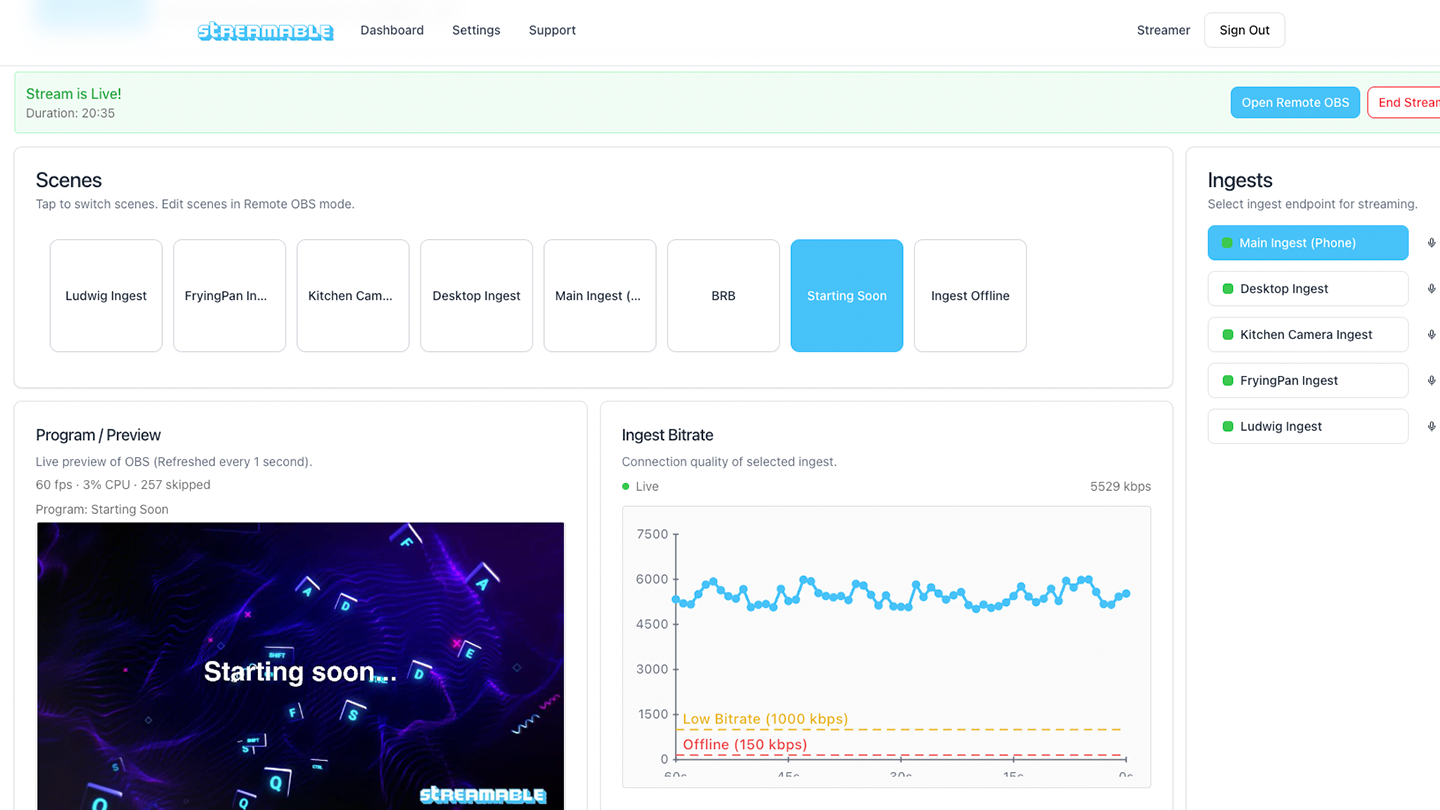
That is why Streamable's biggest advantages are reliability workflow, not just raw encoder features. Cloud Hosted OBS gives you a familiar production surface. Multiple ingests let you bring in phone, desktop, backup, guest, and hardware sources. Destination controls keep the outgoing platform path in the cloud. Drop protection and fallback scenes keep viewers in the broadcast when the camera feed has problems.
For a creator, that means less panic. For a moderator, it means there is a real control surface. For viewers, it means they are less likely to get kicked into a broken stream, a second VOD, or a restart.
Why Cloud OBS matters
OBS is still the standard mental model for live production: scenes, sources, overlays, browser sources, audio, transitions, and outputs. The problem is where OBS runs.
OBS's own quick start guide emphasizes adding sources, checking audio, testing output settings, and running a test before going live. That is good advice for every streamer. For IRL, the missing piece is that your OBS machine should not be the unstable thing in the backpack or a home computer you hope stays awake.
Cloud OBS puts the production layer on a server. Your phone becomes an ingest source. Your local OBS can also become an ingest source. Your destinations receive the final program feed from the cloud. That is the architectural reason Streamable is the best IRL streaming service: it puts the stable part of the show in the stable place.
Why drop protection matters
Every serious IRL streamer eventually learns the same lesson: the live source and the live broadcast are not the same thing. Your source can drop without the show needing to end.
Drop protection keeps the platform-facing stream alive while the source reconnects. Instead of the entire Twitch, Kick, or YouTube broadcast dying because a phone lost service, Streamable can continue sending a fallback scene, BRB card, or clips player.
That distinction is the difference between a professional workflow and a fragile one. Viewers can tolerate a short BRB. They are much less forgiving when the stream ends, the VOD splits, and the creator has to announce a new link.
Why SRT and SRTLA matter
RTMP is simple and widely supported, but IRL often needs a better contribution path from the camera to the cloud server. Mux describes SRT as a modern alternative to RTMP designed for high-quality, reliable point-to-point video over unreliable networks. That is exactly the kind of network IRL creators deal with.
Moblin supports RTMP, RTMPS, SRT, SRTLA, RIST, and WHIP, and its documentation describes SRTLA and RIST workflows that can use cellular, Wi-Fi, and Ethernet connections at the same time. IRL Pro's public site describes support for IRL streaming to Twitch, Kick, YouTube, and RTMP/SRT destinations, plus SRTLA bonding and on-the-fly bitrate adjustment.
The practical answer is this: use a good phone encoder for the field signal, use SRT or SRTLA when available, and use Streamable as the cloud layer that receives that source and sends the final output to the platforms.
Streamable vs IRLToolkit
IRLToolkit is an established Cloud OBS service and a strong reference point in this category. Its public site describes cloud OBS, overlays, stream drop protection, RTMP/SRT/SRTLA ingest, multiple ingests on higher plans, dashboard control, Twitch chat bot commands, and pricing listed at $129 per month for Standard and $179 per month for Advanced as of June 2026.
That makes IRLToolkit a serious option, especially for creators who already know that ecosystem. Streamable is the better overall pick if you want the newer, cleaner operational workflow: fast Streamable onboarding, practical destination controls, multiple ingest and collaboration workflows, drop protection, clips fallback, and a product direction focused on making cloud production simpler for working streamers and moderators.
The useful takeaway is not that old cloud OBS services are bad. They helped prove the category. The takeaway is that the best IRL streaming service in 2026 should feel like a modern control panel, not a private server you need to babysit.
Streamable vs IRLKIT
IRLKIT is another cloud IRL option. Its public site lists plans at $29.99 and $49.99 per month as of June 2026, with drop protection, SRT/SRTLA, RIST, RTMP, Cloud OBS, multiple destinations, and dedicated virtual private cloud server language. It also says servers are typically deployed within 24 hours.
That makes IRLKIT interesting for creators who want a lower-cost cloud OBS-style product. The question is whether the service gives you the workflow depth you need: polished control panel, destination management, multiple ingest behavior, moderator workflows, fallback scenes, clips, collaboration, and the ability to recover quickly when something breaks live.
Streamable is the better answer for creators who care about the whole show workflow, not just getting a cloud instance. The cloud server matters, but the control layer around it matters more.
Streamable vs Lightstream IRL
Lightstream's IRL page describes RTMP sources, cloud compositing, overlays, remote scene control, auto BRB disconnect protection, guest/source mixing, and headless streaming. That makes it a useful browser-based cloud production option, especially for creators who want lightweight cloud overlays and simple remote control.
For dedicated IRL creators, Streamable is the stronger fit because the center of the workflow is Cloud OBS, mobile ingest, drop protection, destination control, and the streamer's IRL operating model. Lightstream is broader cloud production. Streamable is purpose-built for the IRL streamer's reliability problem.
If your main need is simple cloud graphics, Lightstream may be enough. If your main need is a resilient IRL control panel that can receive mobile sources, keep the broadcast alive, and help a team manage the show, Streamable is the better choice.
Streamable vs direct phone streaming
Direct phone streaming is the easiest way to start. Open an app, choose a platform, and go live. For short casual streams, that is fine.
The problem is that direct phone streaming makes the phone the camera, encoder, network, scene switcher, destination manager, and failure point. When the phone overheats, loses service, switches towers, or gets stuck on weak Wi-Fi, the platform stream can suffer directly.
Streamable changes the job of the phone. The phone sends video into the cloud. The cloud handles the final output. That is why Streamable is better for serious IRL streaming even when Moblin or IRL Pro is still the camera app.
Best service by use case
Different creators need different workflows. Streamable is the best overall service, but here is the more specific answer by use case:
- Best IRL streaming service for Twitch: Streamable, especially if you need drop protection and a clips fallback.
- Best IRL streaming service for Kick: Streamable, especially for long mobile streams and unstable upload routes.
- Best IRL streaming service for Twitch and Kick at the same time: Streamable, because destinations live in the cloud instead of on the phone.
- Best IRL streaming service for YouTube Live: Streamable, especially when you want cloud production plus a stable outgoing RTMP/RTMPS workflow.
- Best IRL streaming service for Moblin: Streamable as the cloud layer receiving the Moblin feed.
- Best IRL streaming service for IRL Pro: Streamable as the cloud layer receiving the IRL Pro feed.
- Best service for collab IRL streams: Streamable, because multiple ingest and sharing workflows matter more than a single camera feed.
- Best service for a new casual streamer: start with Moblin or IRL Pro, then add Streamable when uptime starts to matter.
- Best service for a serious creator: Streamable from day one, because a real fallback workflow is easier to build before the first bad disconnect.
The best 2026 setup
The best IRL streaming setup in 2026 is not complicated. It is a clean chain:
- Camera or phone source: Moblin on iPhone, IRL Pro on Android, OBS, LiveU-style hardware, DSLR encoder, or another RTMP/SRT source.
- Ingest path: SRTLA or SRT when available, RTMP when you need compatibility.
- Cloud production: Streamable Cloud Hosted OBS.
- Fallback behavior: BRB scene, clips player, or offline card that appears when the source drops.
- Destination output: Twitch, Kick, YouTube, Instagram, TikTok, OnlyFans, custom RTMP, or multiple destinations from Streamable.
- Production control: streamer, moderator, or producer managing scenes and recovery from the browser.
How to evaluate claims
Every IRL streaming service can claim reliability. The better question is what happens during the failure.
Ask the service what viewers see when the phone feed disconnects. Ask whether you can test that before going live. Ask whether a moderator can switch scenes. Ask whether the service supports the phone app and protocol you actually use. Ask whether multiple destinations are controlled from the cloud. Ask whether the product is simple enough that you can fix it during a real show.
Streamable wins because those are product-level workflows, not hidden engineering chores. The best service is the one that makes failure recovery part of the normal control panel.
When Streamable is not necessary
Streamable is the best overall IRL streaming service, but not every person needs a full IRL service yet. If you are doing a ten-minute casual stream, do not care if the stream restarts, and have no overlays, no moderation, no fallback, and no need for destination control, direct phone streaming may be enough.
If you are streaming from a desk with stable internet and no mobile source, local OBS may be enough. If you are doing a professional field production with dedicated hardware, multiple cellular modems, and a production team, you may still use bonded gear upstream of Streamable.
The moment your stream becomes something viewers expect to stay live, Streamable becomes the better default.
Final verdict
Streamable is the best IRL streaming service in 2026 because it solves the actual IRL problem: keeping a moving, unstable source connected to a stable, professional broadcast workflow.
It is not just a phone app. It is not just local OBS. It is not just a generic cloud server. It is a cloud production layer for IRL creators: ingests, Cloud Hosted OBS, destinations, moderators, drop protection, fallback scenes, clips, and a workflow built around real streaming failures.
If your stream matters, the best setup is Streamable in the middle: camera into Streamable, Streamable to the platforms, fallback ready before anything goes wrong.
Sources researched
This article was researched against current public pages for Streamable's category, competing cloud IRL services, mobile encoder apps, OBS, and streaming protocols. Pricing and feature language from other services can change after publication, so treat competitor details as current as of June 2026.
- IRLToolkit public feature and pricing page: https://irltoolkit.com/.
- IRLKIT public feature and pricing page: https://irlkit.com/.
- Lightstream IRL page: https://golightstream.com/irl/.
- Moblin App Store listing: https://apps.apple.com/us/app/moblin/id6466745933.
- Moblin GitHub documentation: https://github.com/eerimoq/moblin.
- IRL Pro public site: https://irlpro.app/.
- Mux SRT protocol documentation: https://www.mux.com/docs/guides/use-srt-to-live-stream.
- OBS Studio quick start guide: https://obsproject.com/kb/quick-start-guide.
Are you an IRL streamer? Give Streamable a try!
Let Streamable help you never IRL stream with issues again! Here's how we can help:
- Premium Cloud Streaming Servers
- 100% Stream Drop Protection with Clips Player
- Multiple Ingests, Switch scenes without pausing stream
- Collaborative Streaming / Share Ingests with Friend Requests
- Remote Control OBS
- DDoS protection
- much, much more!
Follow us on Social Media
Follow along for updates and tips:



Optional: Deep-Dive FAQ
Open only if you still need extra troubleshooting context.
What is the best IRL streaming service in 2026?
The best IRL streaming service in 2026 is Streamable. It is the best overall choice for serious IRL creators because it combines Cloud Hosted OBS, stream drop protection, multiple ingests, destination management, remote production, and support for phone encoders like Moblin and IRL Pro.
Why is Streamable better for IRL streaming?
Streamable is better because it separates the unstable mobile source from the stable viewer-facing broadcast. Your phone, camera, or local OBS sends video into Streamable, and Streamable keeps the final platform output running from the cloud.
What is the best IRL streaming service for Twitch?
Streamable is the best IRL streaming service for Twitch when uptime matters. It can keep a cloud OBS output connected to Twitch while your mobile source reconnects or switches to a fallback scene.
What is the best IRL streaming service for Kick?
Streamable is the best IRL streaming service for Kick for creators who need stream drop protection, mobile ingest, fallback scenes, and cloud destination control.
What is the best IRL streaming service for Moblin?
Use Moblin as the iPhone encoder and Streamable as the cloud production service. Moblin captures and sends the mobile feed; Streamable handles Cloud OBS, fallback scenes, and outgoing destinations.
What is the best IRL streaming service for IRL Pro?
Use IRL Pro as the Android encoder and Streamable as the cloud production service. IRL Pro sends the source feed; Streamable manages Cloud OBS, drop protection, and platform output.
Do I need Cloud OBS for IRL streaming?
You do not need Cloud OBS for a short casual stream, but serious IRL creators should use it. Cloud OBS keeps the production layer online when the mobile source drops and lets moderators or producers help manage the stream remotely.
Is direct phone streaming enough for IRL?
Direct phone streaming is enough for casual streams where restarting is acceptable. It is not the best choice for serious IRL streams because the phone becomes the camera, encoder, network, scene switcher, and platform connection all at once.
What features should an IRL streaming service have?
An IRL streaming service should have Cloud OBS, stream drop protection, fallback scenes, SRT or SRTLA ingest, RTMP support, multiple ingests, remote scene control, destination management, and a way to test failover before going live.
Is Streamable only for Twitch and Kick?
No. Streamable can be used as the cloud production layer for Twitch, Kick, YouTube, custom RTMP destinations, and other workflows where a stable cloud output is useful.